
Free tracked shipping over US$199 in North America · solos AirGo™ V2 with photochromic lens now shipping
AirGo 3 smartglasses are designed to make hands-free audio and voice assistance feel like part of ordinary eyewear. Rather than placing a screen in front of your eyes, they use open-ear speakers and built-in microphones. You can hear audio while remaining aware of nearby sounds. The frame looks familiar. The technology sits in its arms.
Solos co-founder and CEO Kenneth Fan has discussed the product’s goal of bringing AI into everyday eyewear. In paraphrase, his point is that assistance should fit into daily routines, not require another screen. That distinction matters. AirGo 3 can connect to a smartphone and use the Solos app for features such as voice interaction and AI-powered assistance. Available functions may depend on the app, phone, and region.
Picture asking a brief question while walking, then hearing the response through the glasses. No need to reach for your phone. But the experience is not magic. Wind, background noise, battery life, and network access can affect how well voice features work. Small details matter.
This outline introduces what AirGo 3 smartglasses are, how their microphones, speakers, phone connection, and software work together, and where their limits appear. Smart eyewear is still evolving. Some features may feel useful; others may need refinement. That honest gap is worth examining.
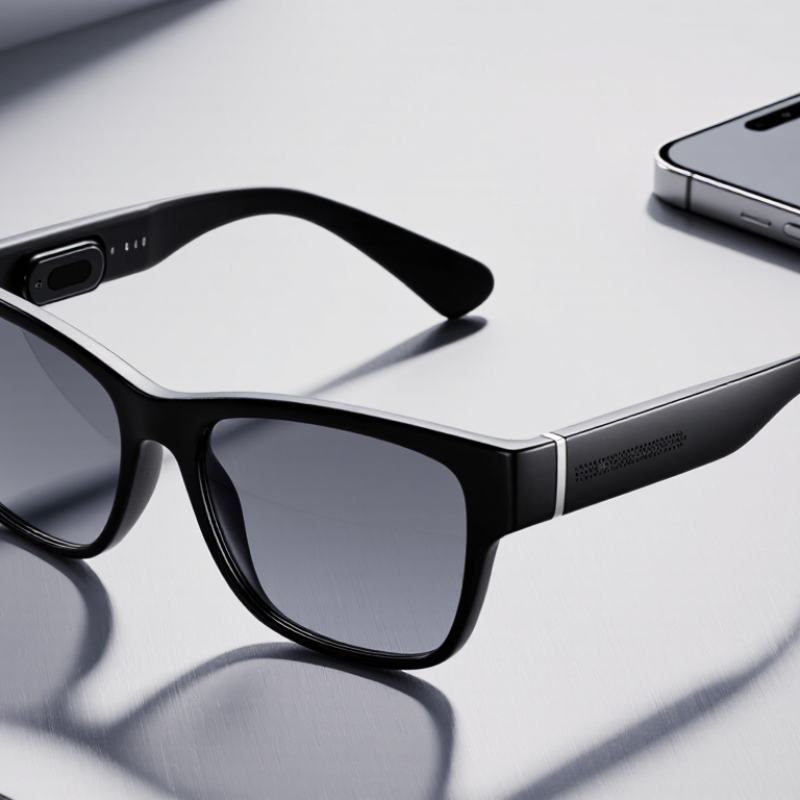
AirGo 3 smartglasses are everyday-style glasses with audio and voice features built into their arms. Small speakers sit near the ears, while microphones pick up spoken commands. They connect to a phone, which handles much of the processing and provides access to supported assistant features. They are audio-first glasses, not a pair of lenses that projects text or maps in front of your eyes. No screen. Their appeal is hands-free access to information while you walk, cook, or keep your phone in a bag.
Think of them as glasses with an added audio interface, rather than a replacement for a phone. You can speak a question and hear a response without looking down at a display. That can feel convenient, though responses may be less useful in noisy places. The experience can feel a little uneven, too; voice recognition and battery life depend on how and where you use them.
Audio-first smartglasses combine familiar eyewear with small electronic parts built into the frame. The lenses provide vision correction or sun protection, while the thicker temples house speakers, microphones, a battery, and wireless components. A phone app usually handles setup and settings. Voice commands travel through the microphones to a connected phone or online assistant; replies play through open-ear speakers near the ears. Fit matters.
Counterpoint Research reported that global smart-glasses shipments rose 210% year over year in the first half of 2024. That growth suggests rising interest, but it does not prove every design is comfortable or useful. Component placement involves trade-offs: larger batteries add weight, while tiny speakers can struggle in noisy streets. Touch controls also need to be easy to find without looking. The frame may look ordinary, yet its balance can feel noticeably different after an hour.
Tips: Check the bridge and temple fit, then listen at a low volume in a quiet room. Test calls in light outdoor noise, too. Ask how the companion app handles voice recordings and what settings you can control. Battery life varies with calls and assistant use, so treat advertised figures as estimates. One limitation is easy to overlook: open-ear audio lets surrounding sound in, which may reduce clarity in busy places.
A simplified view of the typical interaction sequence: glasses capture input, process it, optionally connect to another device, and deliver information through audio or a display.
How to read this: The bars show the order of functional stages, not measured performance or product specifications. Sensors and microphones capture input; the processor interprets it; a wireless link may relay data; and speakers or an optical display provide output. A battery and power-management circuitry supply energy throughout.
Smart glasses can feel almost invisible during a walk, but their information flow is quite practical. Small microphones pick up spoken questions and nearby sounds; touch controls or a button can signal when the wearer wants to interact. The frames do not need to interpret every passing face or street sign. AirGo 3-style glasses are primarily voice-driven, rather than a live visual scanner.
After a spoken request, the glasses send audio through a connected phone, where software can convert speech into text. An assistant service then processes the request and returns a reply. Depending on the settings and connection, some processing may happen through an online service, so a weak signal can slow things down. The response reaches the wearer through small open-ear speakers, leaving the ears uncovered. A quiet café works better than a windy corner. That matters.
The exchange sounds simple, yet it is not perfect. Background chatter can confuse voice recognition, and a short question may be interpreted too broadly. Microphone access and saved interaction history are worth checking in the companion app, since privacy controls can vary. I would treat answers as helpful prompts, not guaranteed facts; details such as names or directions deserve a second check. Small frames, limited battery, and noisy surroundings all shape what the system can reliably do.
Interaction with these smartglasses is designed to keep small tasks close at hand. A user can tap or swipe the touch-sensitive area on a temple to manage audio or activate available functions. Voice commands offer another option when hands are busy, such as asking for information or starting a supported assistant. The exact controls can depend on the phone, software settings, and connected services, so checking the companion app is a practical first step.
The audio is delivered near the ears, rather than through bulky headphones, which can make a short reply feel less isolating. A paired phone may still be needed for internet-based features, and a weak connection can interrupt them. Keep commands simple. A brief request is often easier to understand than a sentence packed with details. Touch gestures may take practice, especially while walking; accidental taps are possible, and that is a real trade-off. Users should review microphone and data permissions before enabling voice features, then adjust settings to match their comfort.
| Control or Interaction Method | How It Works | Common Uses | Practical Notes |
|---|---|---|---|
| Touch controls | A touch-sensitive area on the frame detects taps, presses, or swipes. | Playing or pausing audio, answering calls, and moving between options. | Available gestures and functions differ by device and may be configurable in its companion app. |
| Physical buttons | A button on the frame triggers an assigned action when pressed or held. | Power, pairing, camera capture, or starting and stopping a feature. | The button layout and available actions depend on the model. |
| Voice commands | Built-in microphones listen for supported spoken commands, often through a voice assistant or app. | Making calls, controlling audio, or requesting supported assistant functions. | Availability can depend on language, phone settings, internet access, and the specific device. |
| Companion app | A phone app connects to the glasses, typically over Bluetooth, and provides setup and settings. | Pairing, adjusting preferences, managing permissions, and checking device status. | Some features require a compatible phone and the relevant app permissions. |
| Audio feedback | Speakers in or near the frame play sound; microphones capture the user’s voice. | Listening to media, hearing call audio, and receiving spoken responses. | Open-ear designs let users hear surrounding sounds, though audio may also be audible to people nearby. |
| Visual indicators | Small status lights or display elements communicate device activity, where fitted. | Indicating power, pairing, charging, or camera activity. | Not all smartglasses have a display; indicator meanings vary by device. |
| Phone connection | The glasses communicate with a paired phone, commonly using Bluetooth for audio and control. | Routing calls or media and enabling app-connected functions. | Range, supported features, and connection behavior depend on the glasses and phone. |
| Charging and battery status | The glasses recharge through their supplied charging method, and status may be shown in an app or by an indicator. | Keeping the device ready for calls, audio, and other supported functions. | Charging accessories, battery capacity, and usage time vary by model and use. |
| Note: Smartglasses do not all offer the same controls or features. Check the device’s instructions for its exact gestures, voice commands, indicators, and app requirements. | |||
AirGo 3-style smartglasses are designed for audio, not visual overlays. Small speakers rest near the ears, while microphones pick up voice commands for calls, listening, and assistant features through a connected phone. There is no screen to glance at. That keeps the frames discreet, but it also means directions or answers are heard rather than seen. On a quiet walk, that can feel natural. On a crowded street, speech may be hard to catch, and open-ear audio can leak sound nearby.
For everyday use, they can handle short calls, spoken reminders, and quick translations without reaching for a phone. Features may depend on the companion app, internet access, and phone battery, so they are not a dependable substitute for a phone. GSMA’s 2024 Mobile Economy report estimates that 5.6 billion people subscribed to mobile services in 2023; connectivity is widespread, but coverage and service quality still vary. Privacy deserves thought, too. Voice controls mean speaking aloud, which may feel awkward in a quiet office or on public transport. The glasses also cannot replace a careful look at traffic or surroundings. A practical limitation is easy to miss: people may expect information to appear in their view, but these glasses communicate mainly through sound. That distinction matters.
Small microphones pick up speech and nearby sounds. A touch gesture or button can signal that you want to interact.
They are mainly voice-driven, not live visual scanners. They do not need to interpret every face or sign.
The glasses send audio through a connected phone. Software may turn speech into text, and an assistant service processes the request.
Some features may rely on an online service. A weak signal can delay replies or interrupt them. Not always smooth.
Tap or swipe the touch-sensitive temple area to manage audio or activate available functions. Voice commands offer another option.
Small open-ear speakers play audio near the ears, leaving them uncovered. A quiet café may work better than a windy corner.
Background chatter can confuse recognition, and long requests may be misunderstood. Keep commands simple. Accidental taps can happen while walking.
Review microphone access, saved interaction history, and data permissions in the companion app. Settings can vary, so check what feels comfortable.
Treat replies as helpful prompts, not guaranteed facts. Double-check names or directions; small frames, limited battery, and noise can affect performance.
AirGo 3 smartglasses combine the familiar shape of everyday eyewear with compact electronic components, such as sensors, microphones, audio hardware, a battery, and wireless connectivity. Their design aims to keep the technology wearable and convenient, while allowing the frames to capture selected information from the wearer’s surroundings or voice. The glasses can then process that input on-device or through a connected device, depending on the feature, and provide useful responses or audio feedback.
Users interact through simple controls, such as touch or button gestures, spoken commands, and a companion device. This can make the glasses useful for hands-free assistance, listening to audio, capturing notes, or getting information while moving through daily routines. Practical limits include battery life, comfort, connectivity, processing accuracy, and how well the glasses perform in noisy or complex environments. They are best understood as a supplement to, rather than a replacement for, a phone or other dedicated device.