
Free tracked shipping over US$199 in North America · solos AirGo™ V2 with photochromic lens now shipping

0%

Buying AirGo A5 smartglasses can seem simple until real-world details become important. A sleek frame may look impressive in photographs, yet feel heavy after twenty minutes of walking. Battery claims may sound generous, but constant audio, camera use, and phone connectivity can reduce daily endurance. This guide introduces seven practical tips for evaluating comfort, features, compatibility, privacy, durability, support, and total value before purchase.

Wearable-technology analyst Ben Wood offers a useful buying principle: “A compelling use case matters more than novelty.” That idea fits the AirGo A5 smartglasses closely. Buyers should ask what they expect to do during an ordinary day. Will the glasses provide discreet navigation, hands-free calls, useful audio, or occasional recording? Be specific. Vague expectations often create expensive disappointment.

The following tips focus on details that product pages may overlook. Check the bridge fit, temple pressure, lens options, charging method, and companion-app reliability. Confirm whether the glasses work smoothly with your phone and preferred operating system. Examine warranty coverage and local service availability, especially if replacement parts are difficult to obtain. Privacy also deserves attention, including visible recording indicators and responsible use around other people.

No device is perfect.

The AirGo A5 smartglasses may suit one commuter and frustrate another. Personal vision needs, work habits, and climate can change the experience significantly. A careful buyer should compare specifications with hands-on evidence, not marketing language alone. These seven tips are designed to make that comparison clearer, more realistic, and easier to trust.
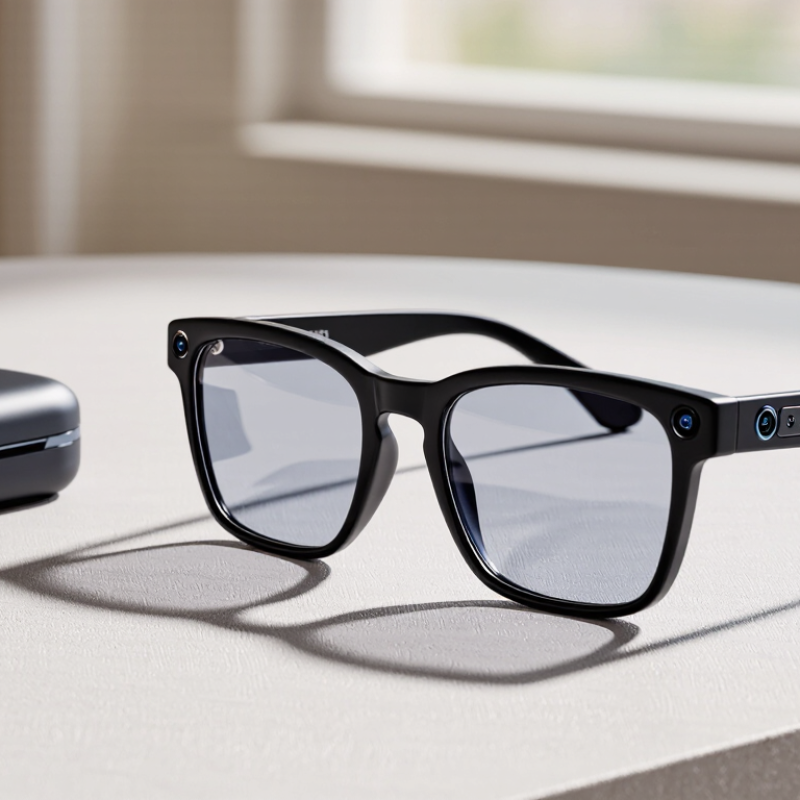
7 Tips for Buying AirGo A5 Smartglasses?

What Are AirGo A5 Smartglasses and Who Are They For?

Smartglasses combine ordinary eyewear with small speakers, microphones, cameras, or display features. Their usefulness depends on the exact model and software. Some provide hands-free calls, voice commands, navigation, and quick audio playback. Others focus on visual information through a small lens display. They are not automatically a replacement for phones. That distinction matters. A buyer should check whether the glasses support their phone, preferred apps, prescription lenses, and local privacy rules.

These glasses may suit commuters, travelers, students, and professionals who want fewer screen interruptions. A commuter might hear directions while watching traffic. A traveler could translate a short phrase without holding a phone. Someone with prescription lenses should confirm lens options before paying. Fit comes first. Frames that press behind the ears can become uncomfortable after an hour. Test them outdoors. Bright sunlight may reduce display visibility, while wind can affect microphone quality.

Before buying, compare battery life, charging time, water resistance, warranty coverage, and repair options. Read independent reviews that mention daily use, not only launch features. Battery estimates can feel optimistic. I would also test voice controls in a noisy café, because quiet-room demonstrations can mislead. Camera-equipped models require extra social awareness. Avoid recording people without clear permission. These glasses are best for users with a specific routine, not shoppers chasing novelty. Some features may still feel unfinished, and software updates can change the experience.

7 Tips for Buying AirGo A5 Smartglasses: What Are Smartglasses and Who Are They For?

Smartglasses are wearable devices designed to add hands-free access to audio, calls, notifications, navigation, photography, or visual information. The chart shows smartphone ownership among U.S. adults, an important indicator of the connected-device audience most likely to consider smartglasses.

When evaluating smartglasses, check smartphone compatibility, comfort and weight, battery life, audio quality, camera or display capabilities, privacy controls, and warranty support. Source: Pew Research Center, smartphone ownership surveys among U.S. adults.

How to Check Compatibility, Prescription Options, and Comfort

Before buying smartglasses, check your phone’s operating system and the companion app requirements. Confirm Bluetooth compatibility, charging support, and whether important features work without constant internet access. Measure your current frame width, bridge size, and temple length. A similar shape usually feels more familiar. Do not trust appearance alone. Check the return period, because fit problems can appear after several hours.

Prescription support deserves careful attention. Ask whether the glasses accept prescription inserts or customized lenses from a qualified optical provider. Confirm the allowed sphere, cylinder, axis, and pupillary distance ranges. Progressive lenses may require extra measurements and may not suit every frame design. Check lens thickness, anti-reflective coating, and UV protection separately. They are not automatically included. I nearly assumed “prescription-ready” meant every prescription would fit. That assumption can become expensive.

Comfort is more than light weight. Wear the glasses for at least twenty minutes, then walk, turn your head, and look down at a screen. Watch for pressure behind the ears, slipping at the nose, heat near the temples, or uneven balance. Short tests can mislead. Very practical. Also check whether controls are easy to reach without touching the lenses. If you use them outdoors, test visibility in bright light and shade. A slightly heavier frame may feel better when its weight is balanced, but personal comfort still varies. Try before committing, when possible.

Which Smart Features, Audio Tools, and Controls Matter Most?

When buying smartglasses, treat the frame as a wearable computer, not a tiny phone. Check whether voice assistance works without repeated commands. Look for clear notifications, translation, navigation, and hands-free note taking. These features should remain useful outdoors. A 2024 GSMA report estimated that 58% of the world’s population used mobile internet, so dependable phone connectivity matters. Test pairing speed before paying.

Audio deserves closer attention. Edison Research’s Infinite Dial 2024 found that 70% of Americans aged 12 and older had listened to online audio recently. That supports choosing glasses with balanced speakers, strong microphones, and adjustable volume. Ask someone to speak while traffic or wind passes nearby. Can you still understand every word? Open speakers feel comfortable, but nearby people may hear private calls. That trade-off is easy to overlook.

Controls should need little attention. Physical buttons help when your fingers are wet or your voice fails. Touch gestures can be faster, but accidental taps become irritating during walking. Check whether commands work with gloves and whether feedback is visible, audible, or both. A 2024 Deloitte Digital Media Trends report found that younger users increasingly favor short, mobile-first content, yet this does not prove they want constant wearable alerts. I would disable nonessential notifications at first. The perfect setting may not exist. Battery life also deserves a real-world test, because advertised hours often exclude heavy camera, audio, and assistant use.

How to Compare Battery Life, Connectivity, Privacy, and Durability

Tip 1: Test battery life during your normal routine, not only in a store. Record playback, calls, camera use, and standby time across one full day. Bright displays and constant wireless connections can drain power faster than advertised. Carrying a charging case may be necessary. That is inconvenient.

Tip 2: Check connectivity in crowded places, such as train stations or busy offices. Look for stable pairing, quick reconnection, and clear audio while your phone stays in a pocket. Read technical specifications, but treat them as ideal results. Real performance depends on distance, walls, software, and nearby devices. I would test both Android and iOS compatibility when possible.

Tip 3: Privacy deserves practical attention. Review camera indicators, microphone controls, stored data, and permission settings before purchase. The device should make recording status obvious to nearby people. Confirm whether photos process locally or transfer through an online account. Policies can change, so save the current privacy notice.

Durability also needs hands-on checking. Examine hinge resistance, lens protection, sweat resistance, and replacement costs. A light frame may feel comfortable, yet fragile after repeated folding. Use a protective case. No product is truly indestructible. My own mistake was trusting a strong water-resistance claim without checking its testing conditions. Look for independent reviews, warranty length, repair options, and firmware support before deciding.

How to Evaluate Pricing, Warranty Coverage, and Seller Reliability

When evaluating smart glasses, treat the advertised price as a starting point, not the final cost. Compare three listings with identical storage, accessories, shipping, and tax. A discount can hide missing lenses, a short return window, or expensive delivery. Write the full price down. I once focused on the lowest figure and overlooked a required charging case. That mistake changed my comparison.

Read the warranty before paying, especially exclusions for batteries, hinges, cameras, and water exposure. Reliable coverage states the duration, repair process, replacement rules, and responsible party. Save the invoice, product page, and support messages in one folder. If coverage depends on regional service, confirm your country in writing. Vague promises are not protection.

Seller reliability requires evidence, not polished photos. Check a verifiable business address, clear contact details, recent independent reviews, and consistent policies. Look for review patterns, not one angry complaint or one perfect rating. Ask whether the item is new, refurbished, or imported through an unofficial channel. Use a payment method with buyer protection where legally available. I still make judgment calls. Reviews can be manipulated, and policies can change after purchase. For that reason, I favor transparent terms over the biggest discount.

7 Tips for Buying AirGo A5 Smartglasses? - How to Evaluate Pricing, Warranty Coverage, and Seller Reliability

A practical, brand-neutral checklist for comparing smartglasses before purchase

# Buying Tip Evaluation Dimension Useful Data or Benchmark What to Verify Risk Indicator
1 Compare the Full Price Total ownership cost Calculate product price + shipping + taxes + prescription-lens charges + accessories + possible subscription fees. Check whether the advertised price includes required hardware, charging equipment, lenses, and software access. Unclear final price
2 Assess the Discount Reference-price credibility A percentage discount is meaningful only when the original price is documented and comparable with current market offers. Compare at least three recent listings with the same storage, lens type, accessories, and condition. Very large discount without history
3 Read the Warranty Terms Warranty duration and scope Look for a clearly stated coverage period, covered components, repair or replacement process, and regional limitations. Confirm coverage for the frame, cameras, speakers, battery, charging unit, and software-related failures. Only verbal promises
4 Check the Return Policy Trial and return conditions Confirm the return window, restocking fees, return-shipping responsibility, refund timing, and rules for opened or customized products. Pay special attention to prescription lenses, hygiene-related exclusions, damaged packaging, and final-sale language. No written return procedure
5 Verify Seller Reliability Seller transparency and history A reliable seller provides a verifiable address, customer-service contact, payment protection, clear policies, and consistent independent feedback. Check review patterns, complaint responses, domain age where available, and whether product descriptions are complete. Only prepaid or irreversible payment
6 Match Features to Your Needs Compatibility and daily usability Confirm supported mobile operating systems, companion-app requirements, connectivity standards, charging method, fit, weight, and stated battery runtime. Check whether key functions work without a paid plan, whether updates are still provided, and whether the frame fits your intended use. Important features require extra fees
7 Review Privacy and Safety Data handling and product safety Review camera and microphone permissions, data-storage practices, account requirements, recording indicators, and applicable electrical or radio compliance information. Read the privacy policy, identify data-sharing choices, and confirm that charging and operating instructions are supplied. Missing privacy or safety documentation
Suggested decision rule: Choose the offer with the clearest total cost, written warranty and return terms, verifiable seller information, and features that match your actual use—not simply the lowest advertised price.

FAQS

What are smartglasses designed to do?

Smartglasses combine ordinary eyewear with speakers, microphones, cameras, or small displays. They can support calls, navigation, translation, voice commands, and audio playback. They do not replace phones.

Who might benefit from wearing smartglasses?

Commuters can hear directions while watching traffic. Travelers may translate short phrases without holding a phone. Students and professionals may reduce screen interruptions. The benefits depend on daily routines.

What should prescription-lens users check before buying?

Confirm prescription-lens support before payment. Check frame width, nose comfort, and pressure behind the ears. A frame may feel fine initially, then become painful after one hour.

How should smartglasses be tested outdoors?

Wear them in bright sunlight and moderate wind. Sunlight can reduce display visibility. Wind can weaken microphone performance. Try voice commands in a noisy café, not only in a quiet room.

Which audio features matter most?

Look for balanced speakers, clear microphones, and adjustable volume. Ask someone to speak while traffic or wind passes nearby. Open speakers may let nearby people hear private calls. That trade-off matters.

Are physical buttons better than touch controls?

Physical buttons can work with wet fingers or failed voice commands. Touch gestures may feel faster, but accidental taps can become irritating. Test controls while walking and wearing gloves.

How reliable is the advertised battery life?

Battery estimates may exclude heavy camera, audio, and assistant use. Test charging time and real-world endurance. The result may disappoint. Frequent notifications can drain power faster than expected.

What privacy habits should camera-equipped glasses require?

Avoid recording people without clear permission. Check local privacy requirements before using cameras in public spaces. Keep notifications limited at first. The perfect setting may not exist.

Conclusion

Buying AirGo A5 smartglasses starts with understanding whether they fit your daily needs, such as hands-free information, audio support, communication, or convenient controls. Consider how you plan to use them and whether their design suits your routine. Before purchasing, check device compatibility, prescription lens availability, frame fit, weight, and long-term comfort. You should also evaluate which smart features, audio functions, microphones, touch controls, or voice options are genuinely useful rather than paying for features you may rarely use.

Next, compare expected battery life, connection stability, charging convenience, privacy controls, and resistance to everyday wear. Think about how the glasses perform during commuting, work, travel, or outdoor activities. Pricing should be judged alongside included accessories, warranty length, return policies, repair support, and seller reliability. A trustworthy purchase should provide clear product details and dependable after-sales assistance. By balancing comfort, practical features, durability, privacy, and total ownership value, you can make a more informed decision.

Amelia

Amelia

Amelia is a professional marketing specialist dedicated to helping businesses understand products, markets, and customer needs through clear, practical, and trustworthy content. With extensive knowledge of the company’s products and services, she regularly contributes expert articles to the......